Hand Animations › Guides
How to see your hand holding items in first person
Updated 2026-10-21 · Minecraft Java 26.2
Vanilla Minecraft has no setting for it. Install the free Fabric mod Hand Animations and a hand holds every item in first person, with swing, use, draw and inspect animations. Press Y to inspect the held item.
In vanilla first person you only see your arm when your hand is empty. As soon as you hold a sword, a pickaxe or a block, the arm disappears and the item floats at the side of the screen. Hand Animations draws the hand back in, holding the item, and animates it.
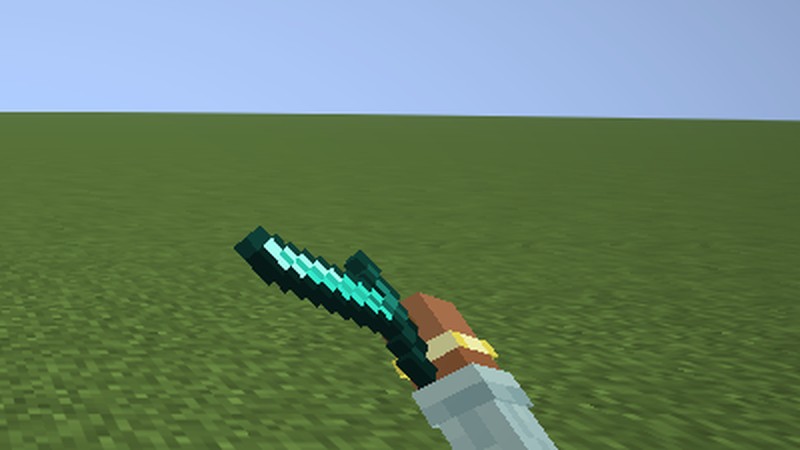
Steps
- Install Fabric Loader for Minecraft Java 26.2 and put Fabric API in your
modsfolder. - Download Hand Animations from Modrinth and put the
.jarin the samemodsfolder. - Start Minecraft with the Fabric profile and join any world or server.
- Hold an item. A hand now holds it at the lower right, and your off hand gets one too.
- Swing, eat, draw a bow or press Y to inspect the item. Every action has its own animation.
Nothing to set up. Your settings are saved across restarts.
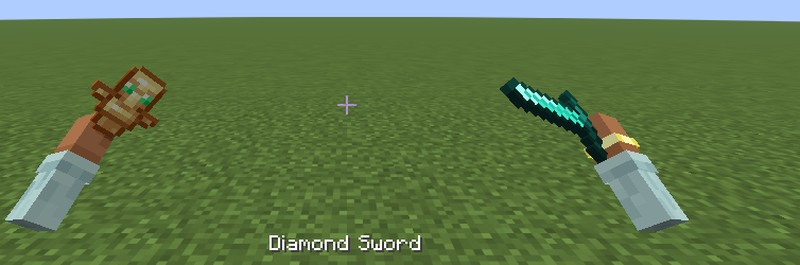
Change how it looks
Type /handanimations or open the settings through Mod Menu. You can hide the off-hand arm, turn off any group of animations, change the sway and inspect speed, and move or rotate the arm with sliders. To make the item smaller or bigger, install NoForcedPacks: Hand Animations follows its held item size and swing speed.
Also in the same mod
Hand Animations is built for Hypixel SkyBlock and picks each item's animation from its SkyBlock type. Resource packs can give any item its own animations and model.
FAQ
- Can I see my hand holding items without a mod?
- No. Vanilla Minecraft Java only shows your arm when your hand is empty. A client-side mod like Hand Animations is needed to draw the hand holding the item.
- Can other players see the hand animations?
- No. Hand Animations only changes your own first-person view. Other players see you as usual, and nothing changes on the server.
- Does it change my attack speed or reach?
- No. It only changes animations on your screen. Attacks, mining and everything the server receives stay the same.