NoForcedPacks › Guides
How to combine texture packs in Minecraft
Updated 2026-10-20 · Minecraft Java 1.21.11, 26.1, 26.2, 26.3
Minecraft can load several packs at once: select them all in Options → Resource Packs, and the pack higher in the list wins wherever two packs change the same thing. To choose per item instead, use the free Fabric mod NoForcedPacks and pick each item's pack in Individual Textures.
Method 1: stack packs in the vanilla menu
- Put all the packs in your
resourcepacksfolder. - Open Options → Resource Packs and move every pack you want to the Selected side.
- Order them with the arrows. For any texture two packs both change, the one higher in the list is used.
The catch: it's all or nothing per pack. If you want pack A's sword but pack B's armor, and pack A also changes armor, stacking alone can't do it. You'd have to merge the pack files by hand.
Method 2: pick a pack for each item (no file merging)
NoForcedPacks adds an Individual Textures screen that lists every item your loaded packs change. For each one you choose which pack's texture you see.
- Install Fabric Loader (Minecraft Java 1.21.11, 26.1.x, 26.2 or 26.3) and put NoForcedPacks in your
modsfolder. No Fabric API needed. - Select all the packs you want in Options → Resource Packs.
- Open Individual Textures from the Individual textures button on that screen, or the TXT Packs button in the pause menu.
- Click an item and pick the pack you want for it, or Vanilla. Search by name to find items fast.
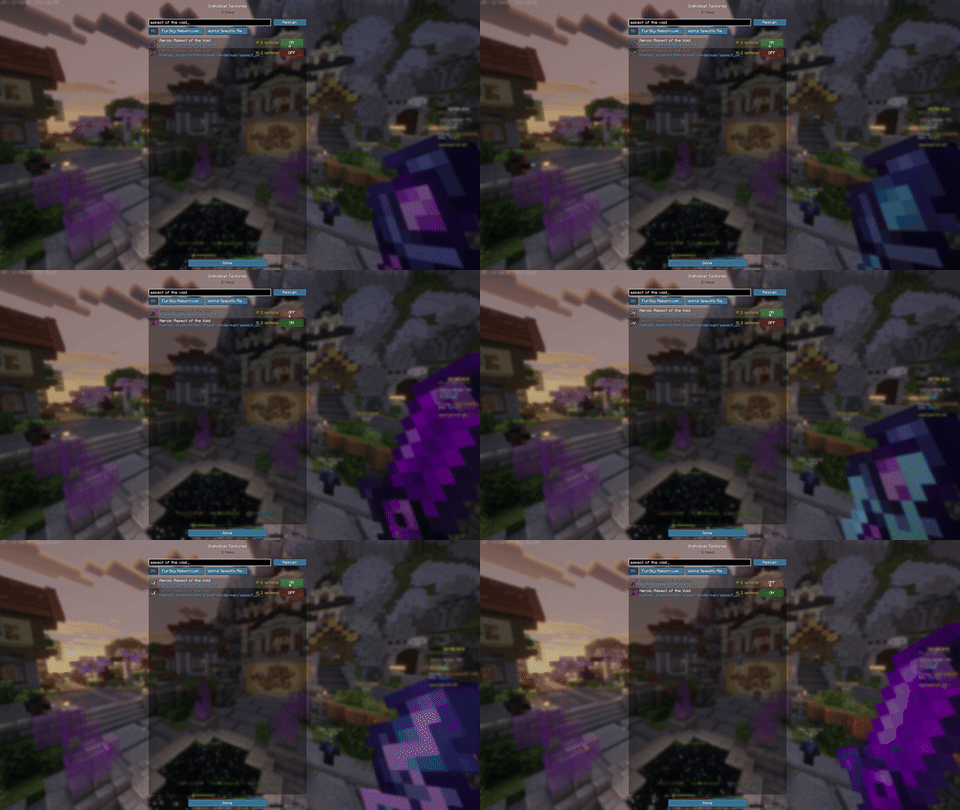
It works with server packs too: for example Hypixel SkyBlock's pack with FurSky, choosing per item. Your worn armor follows your choice, and you can turn off one pack's UI while keeping its items.
FAQ
- Can you use two texture packs at once in Minecraft?
- Yes. Select both in Options → Resource Packs. Where they change the same texture, the pack higher in the list wins. To choose per item, use NoForcedPacks' Individual Textures screen.
- How do I merge two texture packs into one?
- You can copy files from one pack's assets folder into the other by hand, but it's easy to break. NoForcedPacks lets you pick each item's pack in-game instead, with no file editing.
- Does combining packs work with server resource packs?
- With NoForcedPacks, yes. The server's pack shows up like a normal pack, so you can mix its textures with your own packs item by item.