Entity Keepsake › Guides
How to fix entity lag in Minecraft
Updated 2026-10-26 · Minecraft Java 26.2
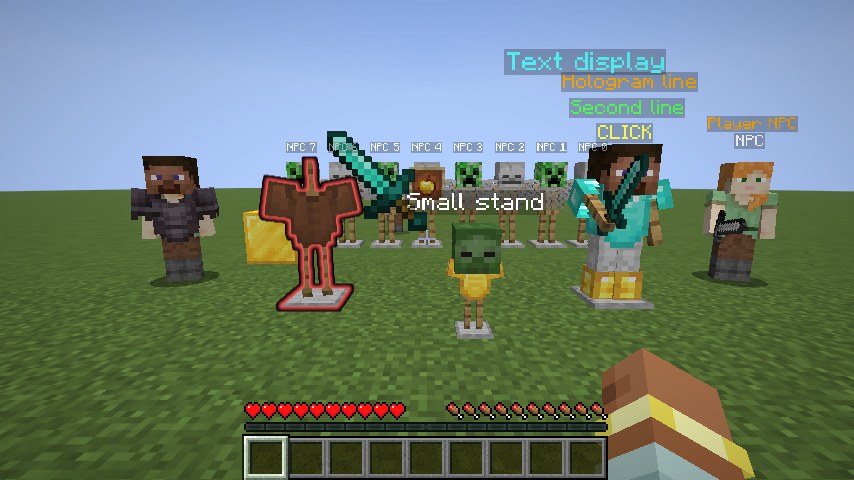
Entity lag comes from Minecraft rebuilding every visible entity every frame, even still ones. Install the free Fabric mod Entity Keepsake: it reuses the work for armor stands, holograms, NPCs, item frames and display entities that haven't changed. Nothing is hidden.
If your FPS drops in lobbies, hubs and spawn areas but is fine in the wild, entities are the likely cause. Holograms are stacks of invisible armor stands, NPCs are full player models, and decorated builds are full of item frames and displays. Each one costs CPU time every frame, whether it moves or not.
Steps
- Install Fabric Loader for Minecraft Java 26.2 and put Fabric API in your
modsfolder. - Download Entity Keepsake from Modrinth and put the
.jarin the samemodsfolder. - Start Minecraft with the Fabric profile and go somewhere crowded.
- Type
/entitykeepsaketo see how many entities are being reused.
Nothing to set up. In a crowded test scene in a SkyBlock modpack, it made this difference:
| Average FPS | 1% low FPS | |
|---|---|---|
| Without Entity Keepsake | 52.4 | 40.4 |
| With Entity Keepsake | 85.3 | 57.2 |
Check the difference yourself
Stand somewhere crowded, turn on the FPS counter, and switch the mod with /entitykeepsake off and /entitykeepsake on. If something ever looks wrong, /entitykeepsake verify compares every reused result with a freshly built one and lists any difference.
Use it with other performance mods
Entity Keepsake works alongside Sodium, Lithium, ImmediatelyFast and Entity Culling. Sodium speeds up blocks, culling mods skip entities you can't see, and Entity Keepsake speeds up the entities you can see.
FAQ
- Why do entities lag more than blocks?
- Blocks are built into chunk meshes once and reused. Entities are rebuilt every frame, so hundreds of them cost a lot of CPU time even when they stand still.
- Will entities look different?
- No. Anything that changes is rebuilt right away, and every cached entity is rebuilt from scratch at least once a second.
- Does it help with mob farms?
- Only a little. Moving mobs are always rebuilt. It helps most with still entities: armor stands, holograms, NPCs, item frames and displays.